


Article's Content
Article's Content
Your buyers increasingly ask ChatGPT for a shortlist before they ever visit a vendor’s site. Until now, you could only measure that from the outside, through a third-party tracker and patchy referral data.
Businesses in ChatGPT is a free OpenAI beta, launched November 10, 2026, that lets verified businesses claim their ChatGPT profile, correct the details ChatGPT uses about them, and see how often ChatGPT cites their website. It all runs through a dashboard called Business Hub.
Profound CEO James Cadwallader calls it “one of the most important moments in the history of AI Marketing.” He has a point. But the data is narrower than it looks. Insights cover up to the last 28 days, and a mention only counts when ChatGPT cites your own website, so recommendations sourced from G2 or Reddit never show up.
This guide covers what Business Hub is, how to claim your business, and what the new data means for B2B brands.
Businesses in ChatGPT at a Glance
- Free beta, launched November 10, 2026
- Two-step verification: a claim check, then a Persona ID check
- Insights show mentions, clicks, and discovery topics for the past 28 days
- A mention only counts when ChatGPT references your website
- Business Agents are currently limited to US ecommerce and online-service businesses
- Claiming your business won’t boost mentions or recommendations
- Published profiles can’t be deleted
Businesses in ChatGPT: Understanding OpenAI’s Latest Commercial Program
Businesses in ChatGPT is OpenAI’s program for giving companies a formal presence inside ChatGPT. It allows businesses to claim their profile, supply their own information, and see aggregated data on how people find them, all through Business Hub.
Until now, ChatGPT pulled what it knew about a brand from the web, and the brand lived with the result.
OpenAI frames the launch around reach, pointing to the 1.2 billion people who use ChatGPT each week. Its Help Center sets expectations on the rest:
“Claiming lets you manage the information you provide about your business. It doesn’t guarantee increased visibility or give you direct control over ChatGPT’s independent recommendations.”
Claiming is open to eligible businesses wherever ChatGPT is available, as long as they have a website. Business Agents are limited to US ecommerce and online-service businesses for now, with more markets and categories planned.
The program also feeds OpenAI’s ad business. A Business Agent can double as the landing page for a ChatGPT ad, building on the Sponsored Agents test OpenAI started in September 2026. Claiming stays free, and OpenAI says paying has no effect on ChatGPT’s answers.
Everything in the program runs through one dashboard: Business Hub.
What Is ChatGPT Business Hub?
Business Hub is the dashboard where you manage how your business shows up in ChatGPT. It includes three tools: your business profile, Insights, and Business Agents.
Find it at chatgpt.com/business-hub or in the ChatGPT sidebar. Almost everything unlocks only after verification.
1) Business Profile
Your profile is the page people see when they click your business name in a ChatGPT answer. Before Business Hub, ChatGPT built that page from whatever it found on the web. A verified profile shows a blue check and the details you supply.

You can edit your website, description, category, logo, delivery and return policies, and add a cover photo. OpenAI reviews every change, and updates take time to show up. ChatGPT may still pull from other sources.
OpenAI’s Businesses in ChatGPT policy sets the rules for what goes on a profile:
- Keep details accurate and current
- No false or misleading claims about prices, availability, qualifications, or results
- No fake reviews, unsupported guarantees, or hidden fees
- Only use logos and photos you have rights to
- Links must lead where they say
OpenAI can reject edits or remove a profile, and it doesn’t verify every detail you submit. Accuracy is on you.
Retailers can also share product feeds with prices and availability. Shopify merchants connect their store. Everyone else uploads a CSV that follows OpenAI’s feed spec, which has 48 fields and nine required ones, according to Flavio Copes’ launch-day walkthrough. A feed gives ChatGPT the right data. It doesn’t guarantee a recommendation or publish an agent.
2) Business Hub Insights
Insights is the measurement layer of Business Hub. It provides first-party data on the mentions and website clicks the business receives through ChatGPT, as well as discovery topics, the most common themes across chats where the business is cited.
Each metric covers up to the past 28 days.
| Metric | What OpenAI counts |
| Mentions | For an online business, each time ChatGPT references the business’s website. The brand name alone doesn’t count. For a local business, each time ChatGPT shows a result for that location, even if nobody opens it |
| Profile views | How many people visit your business profile through ChatGPT |
| Website clicks | How often people click through from ChatGPT to your website |
| Discovery topics | Common themes in answers that mentioned or cited the business. OpenAI says they don’t reveal prompts or measure customer intent |
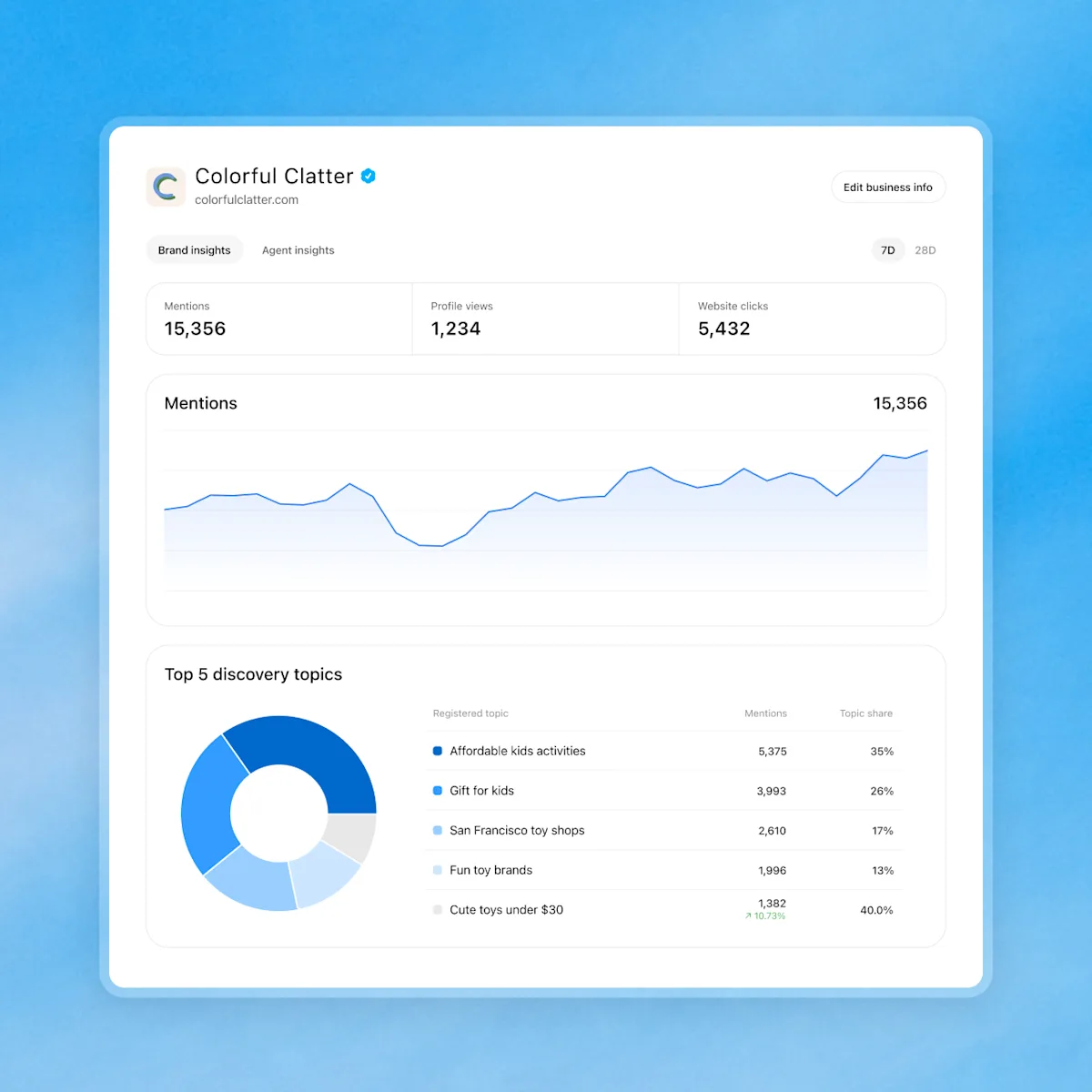
Don’t expect the detail you get from AEO tools like Profound. You never see prompts or conversations, including chats with your own agent. Metrics only appear above a reporting threshold, and OpenAI warns counts may be incomplete, so a blank doesn’t mean zero. OpenAI’s docs describe one 28-day figure per metric with no breakdown below it.
3) Business Agents
A Business Agent is a branded chat that answers customer questions from the product and policy information you provide. When ChatGPT names your business, a customer can open your profile and start a separate, labelled chat with your agent. The agent can compare products, explain policies and link to your site. It can’t complete a purchase or look up an order.

Setup takes four steps:
- Review the information the agent will use
- Write its instructions
- Preview it with real customer questions
- Publish
Shopify merchants may find a draft agent already built.
The Business Agents Policy sets the guardrails. The agent has to say it’s an AI representing your business. It can’t invent prices or reviews, use pressure tactics, guarantee results or give advice that requires a professional license. OpenAI can pause or remove an agent.
Agents are officially open to US ecommerce and online-service businesses that meet the policy’s industry rules. Lily Ray, founder of the consultancy Algorythmic, showed her LinkedIn following what a Business Agent looks like for a B2B service:
You can also sponsor your agent as the landing page for ChatGPT ads. Sponsored placements are labelled, and you can run the profile and read Insights without buying an ad.
How to Claim and Verify Businesses in ChatGPT
Claiming takes two approvals. The claim proves you’re connected to the business. Persona, the identity verification service OpenAI uses, proves who you are. You need both before you can edit your profile or see any data.
Check eligibility first. OpenAI’s policy says not every business can claim a profile, though it hasn’t yet published a list of eligible categories. It may turn down businesses whose offerings raise safety or integrity concerns, and it’s holding back some categories until it has safeguards in place.
You don’t need an ads account or an Enterprise agreement. Online businesses can claim an existing listing and may be able to add a new one. Local stores and restaurants can only claim an existing US listing.
Step 1) Claim Your Business Name
Open Business Hub, search for your business and select the matching listing. Then verify with one of these:
- Business phone: a code by text or call
- Business email: a code sent to the email tied to the business
- Website domain: a TXT record added to your DNS settings
- Shopify store: log in and approve the connection
OpenAI reviews the claim and emails a decision. If someone else already claimed your business, use the Dispute ownership option on the profile.
Step 2) Verify Your Business Hub With Persona
Persona can ask for a government-issued ID and proof you’re authorized to act for the company. Your business details must match official records. The blue check appears once Persona approves.
One warning: if you create a new profile through Persona, approval publishes it automatically. Published profiles can’t be deleted, even by OpenAI Support.
| What you can do | Claim approved | Persona approved | Agent published |
| See the business in your Business Hub | Yes | Yes | Yes |
| Show a blue check | No | Yes | Yes |
| Edit the profile and connect a feed | No | Yes | Yes |
| View insights | No | Yes | Yes |
| Let customers chat with your business | No | No | Yes |
Sharing Business Hub Access
The admin who claims the business can add teammates and grant an agency access, each on their own ChatGPT account. Don’t forward your claim invitation. Each brand is managed separately, with no central view across a parent company’s brands or locations.
What Businesses in ChatGPT Means for Brands
Every brand that can claim a profile should set up Business Hub. Just know it only measures a small part of how ChatGPT sees you, and the gap is widest for B2B SaaS and service brands. Their buyers build shortlists from review sites, communities, comparison pages, and more than one AI engine.
Foundation strategist Tanya Desai suggests this could be the start of a “verification economy”, where leading AI platforms ask brands to prove who they are.
First-Party AI Visibility From a Frontier Model
For the first time, brands get numbers from ChatGPT itself, plus a way to fix wrong details. OpenAI also kept prompts private and ads labelled, which protects the trust that makes a recommendation worth earning.
The Mention Count Will Mislead if You Let It
Business Hub only counts a mention when ChatGPT references your website. It misses every mention that comes from off-site sources. In our State of B2B AI Discovery 2026 report with AirOps, covering about 380,000 AI answers, Reddit and G2 alone drew nearly 9% of about 3 million citations. Comparison pages and listicles made up 84 of the 100 most-cited URLs.
Clicks Matter More Than OpenAI Suggests
For B2B brands, clicks connect to pipeline. Divide clicks by mentions for a rough AI click-through rate, then compare Business Hub clicks with ChatGPT sessions in GA4.
The Hub counts clicks inside ChatGPT, so you have a solid baseline even if model changes cause issues for referral tracking tools. We saw this recently when OpenAI dropped the utm_source=chatgpt.com tag and GA4 filed those visits under other channels. Treat it as a floor. Profound found more than 97% of visits after a ChatGPT brand mention carried no UTM tag.
Business Hub Data Lacks Context
You get your count with no category total, no competitors and nothing on how you’re framed. It also only covers ChatGPT, and our report found Google’s AI surfaces and the standalone assistants pull from two different internets. That mix moves fast. ChatGPT’s Reddit citation rate on B2B prompts more than halved from 21.41% in July to 10.05% in August.
Treat Business Hub as a new owned metric and report it next to per-surface citation tracking.
“For the first time, ChatGPT is showing brands their own numbers. That’s a big deal. Just remember it’s only a slice of how buyers find you.”
Ross Simmonds, CEO of Foundation Marketing
The Profile Is One Input
ChatGPT keeps reading other sources, and OpenAI won’t resolve every factual dispute. Fix wrong details where they live. In our report, one negative comparison page was cited 972 times in about a month. That’s where most of the work sits: research, content and distribution across the sources AI pulls from.
What to Do Next
- Claim and verify your business using the steps above.
- Match your description and category to how you describe yourself everywhere else, and cut outcome claims you can’t prove.
- Log mentions, clicks and topics weekly, since the 28-day window keeps no history.
- Compare Business Hub clicks with GA4 for the same window.
- Report the number as “ChatGPT website references,” never as AI visibility.
- Keep tracking citations across every AI surface.
- Hold your Business Agent until your profile and feed are accurate.
Is Your Business Visible Across All AI Surfaces?
Business Hub is a big first step. For the first time, OpenAI is showing brands how ChatGPT sees them, from its own data. The click count is a floor and the mention count is narrow. Both cover ChatGPT alone, and neither explains why ChatGPT recommends one brand over another.
That answer lives in the reviews, communities, videos, and pages ChatGPT reads before it names anyone. Brands that build that presence will see it show up in Business Hub. Brands that only polish their profile will mostly see blanks.
Foundation helps B2B tech and SaaS brands get found, cited and recommended when buyers ask AI for solutions. If you want to see how your brand shows up across ChatGPT, Google’s AI surfaces and the sources they cite, talk to our team.
ChatGPT Business Hub FAQs
Is Businesses in ChatGPT free?
Yes. Claiming your business, editing your profile and viewing Insights are free. Sponsoring a Business Agent through ChatGPT ads is a separate, paid option.
Does claiming my business help it show up more in ChatGPT?
No. OpenAI says claiming doesn’t guarantee more visibility, and ads don’t influence ChatGPT’s independent answers.
What counts as a mention in ChatGPT Business Hub?
For an online business, a mention counts when ChatGPT references your website. Your brand name alone doesn’t count.
Can I delete my ChatGPT business profile?
Only drafts can be deleted. Once a profile is published, OpenAI Support can’t delete, unpublish, or hide it.

