
Article's Content
Article's Content
We analyzed 8,566 keywords across more than 130 B2B SaaS categories to see how often YouTube appears in searches with buying intent.
YouTube ranked in Google’s top 10 for 80.2% of “demo” searches, 22.5% of “best” searches, and 20% of “vs” searches. It also outranked at least three SaaS vendors across 1,723 keywords representing more than 513,000 monthly searches.
In a separate analysis, we found a 0.737 correlation between YouTube mentions and AI visibility. It was the strongest relationship among the factors included in the study, ahead of Domain Rating and backlinks.

These findings don’t mean uploading more videos will automatically make ChatGPT recommend your brand or that you’ll top the SERPs. But it shows that brands with a stronger presence on YouTube also tend to appear more prominently in AI-generated answers and Google.
And that’s not all. Google is creating more ways for video to enter those answers. Its AI-powered YouTube search carousel can identify relevant clips and generate descriptions around them. Google Search can also use timestamps from a YouTube description to surface specific moments from a video.
B2B brands can win here without attracting millions of views. A smaller library of videos built around the right buyer questions can keep surfacing across Google, YouTube, and AI-generated answers.
The process starts with finding where video already ranks, then creating answers that search engines and AI systems can easily understand.
Why YouTube Is Well-Suited to AI Search
A video initially looks like an awkward source for a text-based answer engine. The useful information may be buried inside 10, 20, or 45 minutes of footage, while a webpage exposes its answer as text.
YouTube closes much of that gap.
A published video can include a title, description, captions, transcript, chapters, and timestamps. Google can also identify key moments within a video and direct searchers to the section most relevant to their question.
This structure breaks a long recording into smaller, retrievable sections. Google doesn’t need to treat a 30-minute webinar as one indivisible asset. It can surface the moment where a speaker explains a feature, completes a workflow, or answers a specific question.
YouTube also contains the kinds of content buyers ask AI systems to find: demonstrations, tutorials, reviews, and comparisons.
When someone wants to learn how to connect two applications, an article can describe the workflow. A video can show the interface, the sequence of clicks, where problems usually occur, and what the finished result looks like.
A comparison video can do the same for a purchase decision. Instead of repeating claims taken from two landing pages, the creator can open both products and show how they handle the same job.
YouTube therefore sits at the intersection of traditional YouTube SEO, practical experience, and generative engine optimization.
Optimizing for that intersection starts before you press record.
How to Build an AI-Ready YouTube Channel
Building an AI-ready YouTube channel comes down to three moves. Find where video already wins in a category, build a library of videos around real buyer questions, and package each video so search engines and AI systems can find the answer inside it.
None of these moves require a bigger production budget or a larger subscriber base. The advantage comes from matching content to demand.
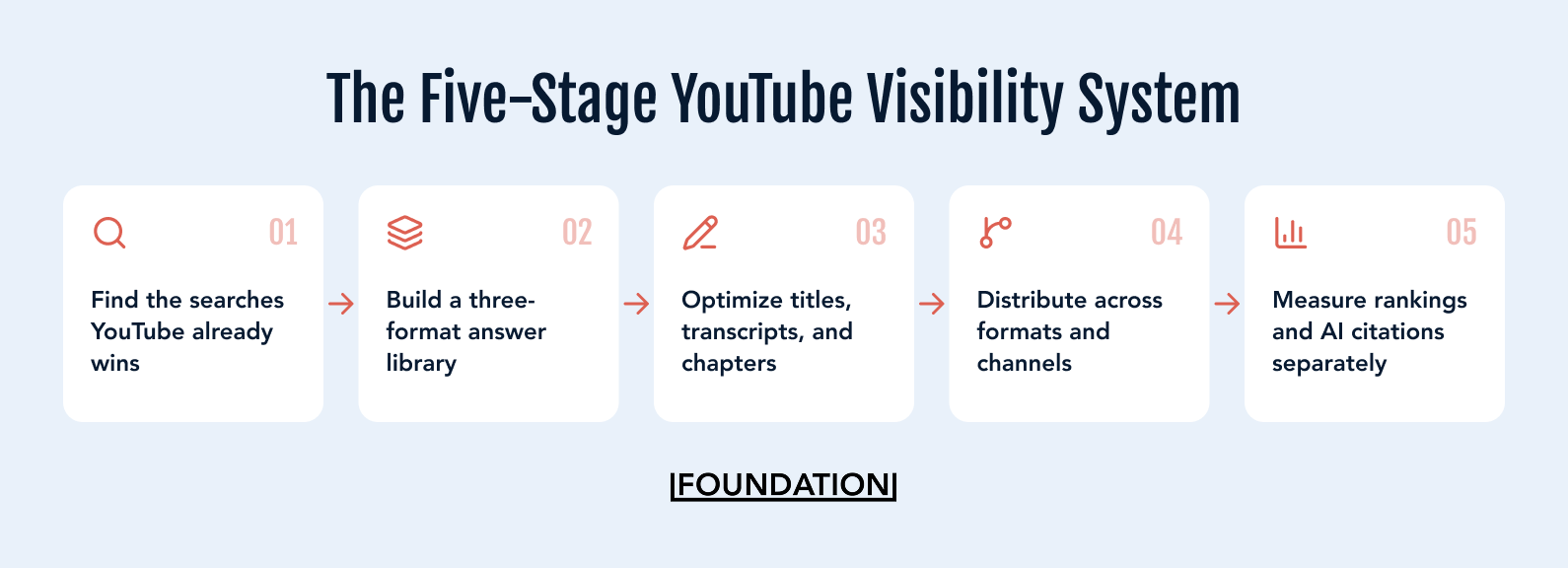
Step 1: Find the Searches Where YouTube Already Wins
Start by finding the buyer questions Google already answers with video. These searches give you stronger direction than an open-ended brainstorm about what the company could film.
i. Prioritize Search Hits Over Viral Hits
A viral video spreads because its topic or packaging attracts a broad audience. YouTube continues recommending it while viewers respond, but that momentum can disappear as the interested audience runs out.
A search-led video serves a recurring need.
It could be that the viewer wants to see a product demonstration, compare two platforms, or learn how to complete a task. New people continue to search for that answer, allowing the video to attract viewers long after its publication.
Both formats have a place in a YouTube strategy. Search-led videos provide a clearer path to AI visibility because their subjects align with identifiable buyer questions.
Google’s results can tell you where these opportunities already exist.
Our research found YouTube in the top 10 for 4 out of 5 B2B SaaS “demo” searches. It also outranked three or more vendors across 1,723 keywords.
That means your category may already contain search results where Google prefers a useful video over another product or landing page. Your job is to find them.
ii. Find the Queries That Already Surface Videos
Start with the problems, comparisons, and decisions buyers encounter before purchasing your product.
Then check which searches return YouTube videos in Google’s main results, video carousels, or key moments.
You can scale the research with an SEO platform such as Ahrefs:
- Enter youtube.com in Site Explorer.
- Open the Organic Keywords report.
- Filter for positions one through three.
- Add terms related to your category.
- Review the videos ranking for each relevant query.
Here’s what the return looks like for a search like “project management”.

A project management company might search YouTube’s rankings for terms related to industries they serve. The resulting queries reveal where Google already considers video a suitable response.
You can also find opportunities by studying:
- Google and YouTube autocomplete
- Videos ranking for your competitors’ branded searches
- Terms bringing viewers to your existing videos
- Questions raised during sales calls
- Recurring support requests
- Conversations inside relevant communities
- Follow-up questions generated by AI tools
YouTube recommends using the Research tab in YouTube Analytics and Google Ads Keyword Planner to identify the terms viewers use. Its official guidance for video descriptions also recommends choosing one or two primary terms and featuring them prominently in the title and description.
iii. Check Which Queries Also Produce AI Answers
A video ranking in Google doesn’t guarantee that ChatGPT, Gemini, or Claude will cite it. But the search results still provide a useful filter: they show that the content has been discovered and judged relevant to the query.
The next step is to test those subjects across the AI platforms your buyers use.
Look for:
- Prompts that return YouTube citations
- Channels cited repeatedly within your category
- Videos used to support product recommendations
- Follow-up questions generated by each platform
- Subjects appearing across Google and AI answers
- Competitor videos influencing the response
- Valuable prompts with no useful video response
An AI visibility platform can help you run this analysis at scale. Manual testing can still reveal the initial patterns.
Create a fixed set of prompts and run them across your AI tool of choice. Record which sources appear and what each platform says about your category.
The resulting query map might look like this:

Prioritize queries that combine visible demand, commercial relevance, and an established role for video. You’re looking for places where a video can help a buyer and strengthen your presence in the sources shaping their research.
Step 2: Build a YouTube Answer Library
A surprising number of B2B YouTube channels function as company archives.
The marketing team uploads a webinar. Product adds a release demo. HR publishes an employer-brand video. A conference recording appears two months later with its original session title.
Useful information may sit inside those videos, but neither the buyer nor a search engine can tell what the channel knows.
An AI-ready channel works more like an answer library. Each video addresses a recognizable question, while related videos build depth around the subjects the company wants to own.
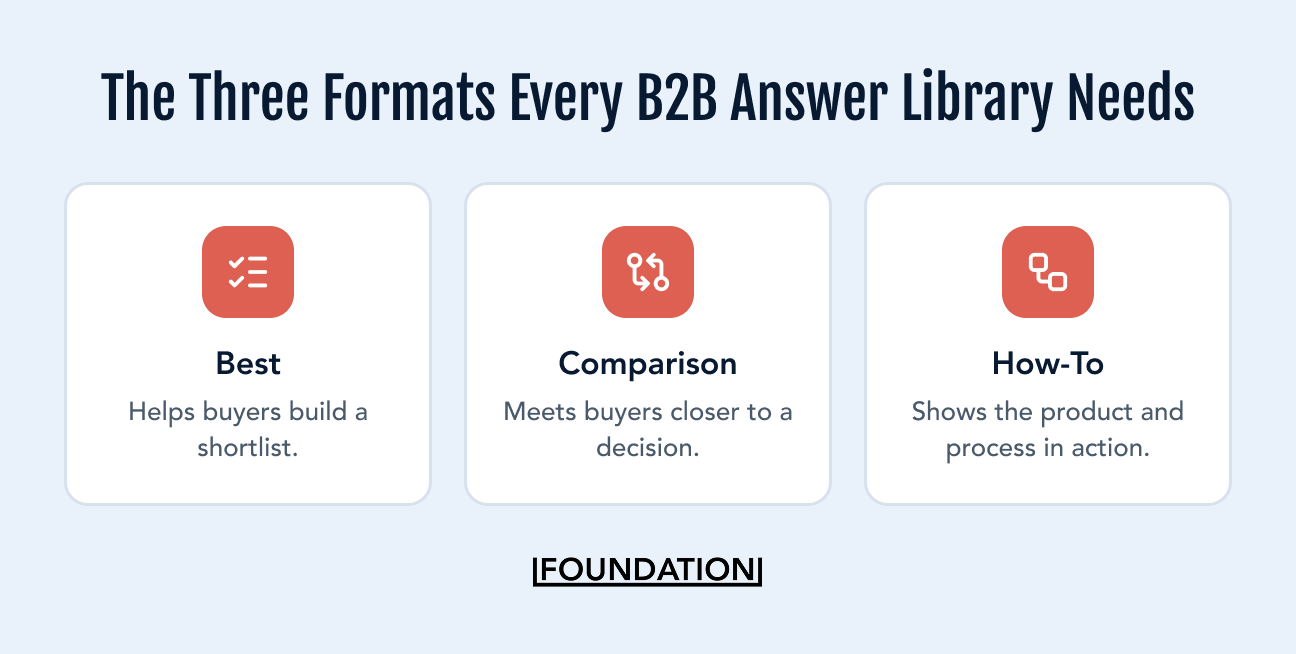
i. Create “Best” Videos for Buyers Building a Shortlist
“Best” searches show that someone has moved from understanding a problem to considering ways to solve it.
The query may ask for:
- The best software within a category
- A tool suited to a specific company size
- Recommended products for a particular use case
- The most effective method for completing a job
- Leading options within a set budget
These searches become more specific when a buyer uses an AI assistant. Instead of searching “best CRM,” someone can describe their team size, sales process, current tools, and budget, then ask for a tailored shortlist.
A broad “10 best tools” video may not satisfy every variation of that request. Build videos around narrower buying contexts:
- Best CRM Software for a Five-Person Sales Team
- Best Project Management Tools for Client-Facing Agencies
- Best Inventory Software for Multi-Location Retailers
- Best Marketing Automation Platforms for HubSpot Users
A narrower video may attract fewer viewers, but the audience is more likely to recognize itself in the answer.
ii. Publish Comparisons Before Someone Else Defines the Differences
Comparison videos meet buyers closer to a decision.
They may compare two products, two approaches, or two ways of acquiring a capability. A company can compare its own product with a competitor, but the video needs enough honesty to help the buyer choose.
Show both products where possible. Explain which jobs each handles well and where the limitations appear. Tell the viewer when a competitor may be the better option.
A conclusion that recommends your product to everyone only confirms what the viewer expected from a vendor.
The principle behind SEO comparison pages applies to video too: buyers are already evaluating the products, so give them a useful framework for making that decision.
Use How-To Videos to Demonstrate Experience
How-to content allows a B2B brand to teach the job its product supports.
A payroll platform can explain how to pay international contractors. A cybersecurity company can demonstrate how to investigate a suspicious login. A revenue intelligence vendor can show a sales leader how to inspect a slipping pipeline.
Some tutorials should focus on the product. Others can teach the wider process and introduce the software only where it helps.
Video gives these explanations something an ordinary article may lack: visible proof.
Open the product. Complete the workflow. Show where a user may get stuck. Explain what happens when the conditions change. Include the judgment someone develops after completing the process several times.
That first-hand detail gives buyers more than a summary assembled from product documentation. It also gives search engines and AI systems a source containing information that may not exist elsewhere.
Together, best, comparison, and how-to videos cover discovery, evaluation, and execution. They also align with the practical questions buyers bring to answer engines.
iii. Match the Format to the Search Intent
Don’t make a two-minute thought-leadership clip when every result for the target query is an in-depth tutorial.
Also, avoid filming a 30-minute webinar when buyers want a direct product comparison.
Review the leading results and ask:
- Which format dominates?
- How long are the ranking videos?
- How experienced is the intended viewer?
- Which questions do the videos answer?
- Where do they remain vague?
- What can your company demonstrate that the current results cannot?
The ranking formats reveal what searchers expect from the video. Use that expectation as the baseline, then improve on the existing results with clearer explanations, stronger evidence, or first-hand demonstrations.
Step 3: Make Every Video Easy to Find and Understand
Choosing the right topic gets the video into the competition. The way you script and package it affects whether Google and LLMs can identify the answer and whether a viewer stays long enough to receive it.
i. Put the Search Subject in the Title
YouTube distinguishes between searchable titles, which clearly describe what viewers will get, and intriguing titles designed to create curiosity.
For search-led videos, clarity should win.
Compare these titles:
- The Forecasting Mistake Destroying Your Quarter
- How to Build an Accurate B2B Sales Forecast
The first could attract attention in a recommendation feed. The second tells Google, AI tools, YouTube, and the viewer exactly what question the video answers.
You can still create curiosity through the thumbnail, the angle, or the promise. The title shouldn’t hide the subject the video was built to address.
YouTube’s guidance for titles and thumbnails recommends searchable titles when the goal is to reach viewers looking for similar content.
ii. Answer the Question Early
The opening should confirm what the title promises.
State the problem and provide a useful answer to the viewer before expanding on context. When introducing a product, method, or concept, use its complete name. Define unfamiliar terminology rather than assuming the viewer understands it.
A video titled “How to Calculate Customer Acquisition Cost” should not spend four minutes discussing startup growth before presenting the formula.
Give the short answer. Work through an example. Then explain the exceptions and common mistakes.
This makes the video easier to follow and creates a self-contained transcript passage that can be understood without the full recording.
iii. Review the Captions and Transcript
Automatic captions can turn a product name, statistic, or technical term into something else.
Review the captions before publication, paying particular attention to:
- Brand and product names
- Acronyms
- People’s names
- Industry terminology
- Numerical claims
- Instructions where one incorrect word changes the meaning
Accurate captions make the content more accessible. They also give Google and YouTube a more reliable textual representation of what was said.
Cleaning the transcript removes ambiguity from one of the main textual assets. It cannot guarantee a citation, but it gives Google and YouTube a more accurate account of what the speaker said.
iv. Use Chapters as Mini Answers
A 20-minute video may answer several related questions. Chapters show viewers and Google where each answer begins.
Google says it can detect key moments automatically, but creators can also specify important sections through timestamps and labels in the description. Google may then use those key moments in search results.

The chapter labels need to describe what someone will find.
These labels reveal little:
- Introduction
- Features
- Demo
- Conclusion
These are easier to interpret:
- What Revenue Intelligence Software Does
- How Automated Sales Forecasting Works
- Clari vs. Gong for Pipeline Inspection
- When a Spreadsheet Is Enough
Here’s an example from a video Ross made with Sterling Sky Inc on how to win in a world dominated by AI content.
The chapters clearly label what the conversation is about.
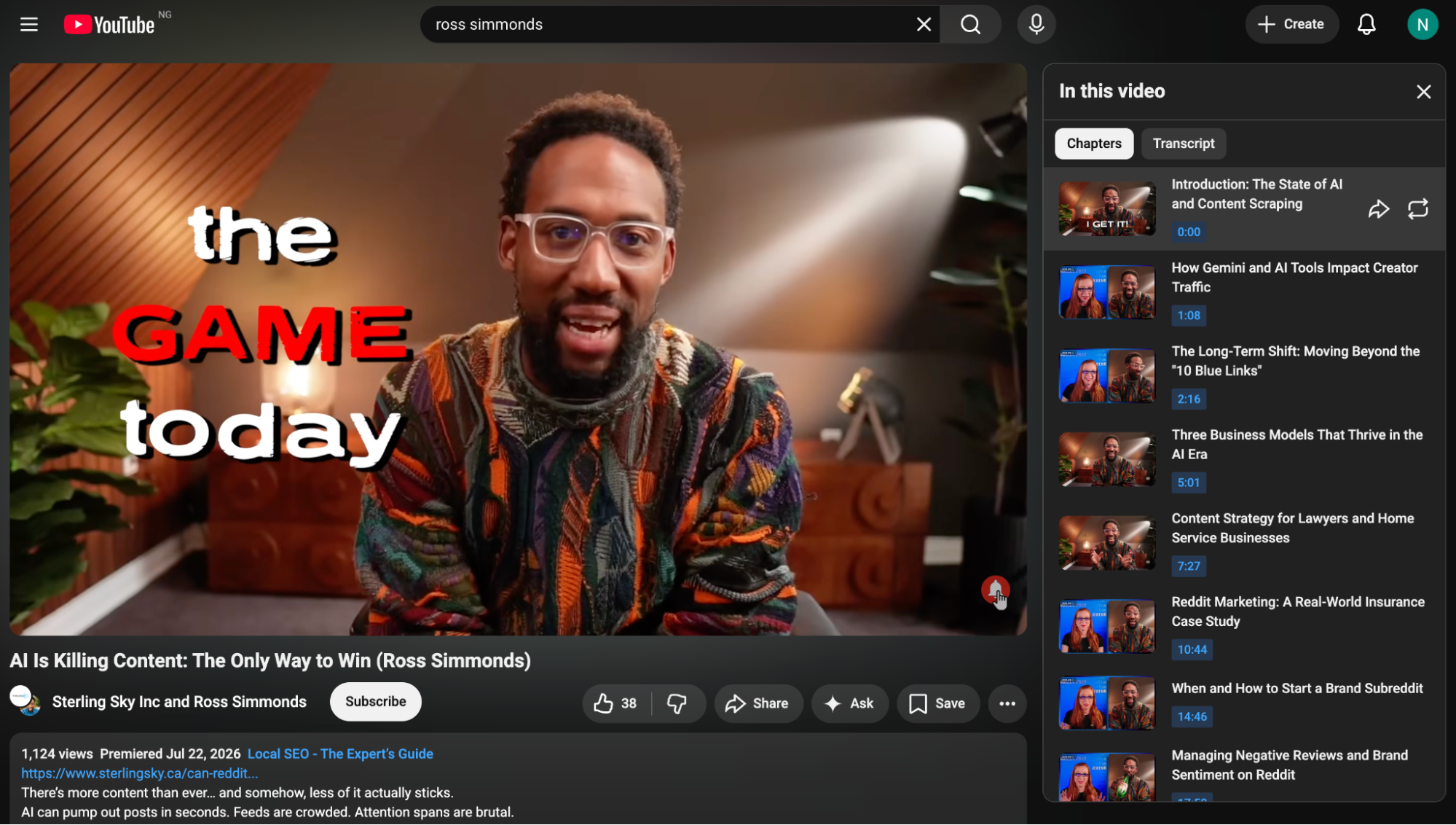
Write each chapter so it makes sense on its own. Someone landing directly at 6:42 should know what the section will answer without watching the first six minutes.
v. Turn the Description Into a Useful Summary
A well-written video description provides YouTube and other systems with a clear textual summary of your video’s topic. Alongside your title and transcript, it provides structured context that can help text-based retrieval systems understand what the video is about.
Research in video-text retrieval shows that metadata such as titles, subtitles, and other associated text improves the matching of videos to natural-language queries.
Start the description with a concise summary that explains what the video covers, who it is for, and what viewers will learn.
YouTube recommends giving each video a unique description and using the opening lines to describe the content before the viewer selects “Show more.”
This helps ensure the most important context is immediately available to both viewers and retrieval systems.
Use the rest of the description to reinforce that context with supporting information, such as:
- Descriptive chapter timestamps
- Supporting research and references
- Relevant product or documentation links
- The speaker’s name and role
- Related articles and resources
- A logical next video or playlist
Here’s a good example of a YouTube description. Thanks to the description, you can tell what the video is about even before watching it.

Avoid filling the description with small variations of the same keyword. You are providing context, not trying to overwhelm the algorithm with repetition.
vi. Show the Evidence Behind the Answer
Videos become stronger potential sources when they contribute information beyond what already appears across the ranking pages.
That contribution could come from:
- An original experiment
- A live product demonstration
- Internal or customer data
- A side-by-side test
- Expert commentary
- A process developed through experience
- An opinion supported by evidence
Attribute external research when you use it and link to the source in the description. When presenting internal data, explain how it was collected and what the findings do not prove.
Our 0.737 correlation between YouTube mentions and AI visibility is a good example. The result supports a relationship between the two factors. It doesn’t prove that opening a YouTube channel will predictably increase ChatGPT’s visibility.
The finding becomes more useful when the reader can understand both its potential and its limitations.
vii. Use On-Screen Text Where It Adds Clarity
On-screen text gives AI systems another source of information about your video’s content. Video indexing systems can extract visible text using optical character recognition (OCR), while multimodal AI models can interpret text within video frames alongside spoken dialogue and transcripts.
Microsoft Azure AI Video Indexer, for example, extracts on-screen text and uses it alongside transcripts to identify keywords, entities, and topics within a video.
Use text overlays to reinforce important definitions, product names, feature names, key steps, or outcomes that are central to the video’s topic. When those terms are visible on screen and spoken aloud, they provide multiple, consistent signals about what the video covers.
Keep on-screen text consistent with the rest of your content. Your title, spoken explanation, captions, transcript, chapters, and overlays should all use the same terminology. Consistency makes it easier for both viewers and AI systems to build an accurate understanding of the video’s subject.
This approach is particularly valuable for technical demonstrations, tutorials, and product walkthroughs, where viewers, and AI systems, need to quickly identify commands, interface elements, or workflows. Rather than adding text to every sentence, use overlays to emphasize the concepts most important to understanding the video.
But individual video optimization can only carry the strategy so far.
Why You Should Organize the Channel Around the Topics You Want to Own
The channel itself should tell a consistent story about the brand’s expertise. Someone arriving after one useful video should be able to find the next relevant answer without starting another search.
Begin with the channel description. Name the audience, category, and problems your videos cover. Link to the company website and clarify the relationship between the channel and the brand.
Then build playlists around the work buyers want to complete, rather than around the recording’s internal format.
A revenue intelligence platform might create playlists for:
- Sales forecasting
- Pipeline management
- Conversation intelligence
- Revenue operations
- Product demonstrations
- Software comparisons
“Webinars” describes how the content was produced. “How to Improve Sales Forecast Accuracy” describes why someone would watch it.
Feature the strongest entry-point video for each major topic. Use descriptions, cards, and end screens to connect related videos.
Over time, the channel becomes a structured collection of expertise rather than a sequence of disconnected uploads.
How To Turn Your Existing Videos Into AI-Ready Assets
You may already have enough footage for the first version of this strategy.
Recorded webinars, podcasts, customer interviews, conference sessions, and product walkthroughs often contain useful answers. They were simply packaged around the event rather than the question.
Audit the existing library for moments that match the three core formats:
- A customer explains why they selected one approach over another.
- A product specialist completes a difficult workflow.
- An executive answers a common industry question.
- A guest compares two methods.
- A webinar contains a clear recommendation for a specific use case.
Start with the videos closest to a buyer decision. Correct their captions, rewrite vague titles and descriptions, and add descriptive chapters.
Then look for sections that can be made into standalone videos or Shorts.
A 40-minute webinar about revenue operations might produce:
- A long-form guide to building a revenue forecast
- A video explaining why sales forecasts become inaccurate
- A comparison of manual and automated forecasting
- Several Shorts answering narrower questions
Our analysis found YouTube Shorts appearing in the top 10 for more than 1,100 “best + software” searches worldwide. In the US, Shorts held a top-10 position in 475 of these searches and ranked first in 3 out of every 4.
Do not select clips only because the moment is entertaining. Start with a question the buyer searches, then find the part of the recording that answers it.
The footage is the raw material. The query determines how you package it.
Repurposing that footage only pays off once it reaches the places AI systems and buyers actually look. That’s a distribution question, not a production one.
Build a Distribution Loop Around Every Video
Publishing on YouTube creates one route to discovery. AI systems don’t only draw from that page. They also pull from the other pages, posts, and conversations that reference it. Distribution is what puts your video in front of those sources.
Embed the video in a relevant article. Turn its main explanation into a written guide. Share the original finding on LinkedIn. Cut specific answers for Shorts. Include the walkthrough in product documentation. Give sales a clip that handles a recurring objection.
Your content can have so many lives.
This is the Content Relay: one strong idea moves through several formats and channels without becoming a lazy copy-and-paste exercise.

Each version should suit where you’d be posting it.
The article can add detail, examples, and internal links. A Short can answer one narrow question. A social post can lead with the strongest finding. The full YouTube video can demonstrate the complete process.
Our content supply chain framework explains how to build the system behind that expansion.
Distribution also creates more opportunities for websites, creators, newsletters, and communities to reference the work. This helps the brand establish a presence beyond its owned assets.
That wider footprint has become an important part of how B2B buyers discover brands through AI. Your website may hold the clearest description of your product, but AI-generated answers can draw on conversations and content distributed across several platforms.
Distribution, not the original view count, is usually what decides whether a video becomes a source AI systems can find.
Channel Growth Isn’t AI Visibility
Views and subscribers tell you whether the channel is reaching and retaining an audience. They don’t show whether the videos influence AI answers.
So you need to track both layers.
For YouTube and Google, monitor metrics like search impressions and views, Google rankings for target searches, and website visits and conversions from YouTube.
For AI visibility, you can monitor the percentage of tracked prompts mentioning the brand, prompts citing the brand’s videos, citation share against competitors, and referral traffic from AI platforms.
Use a fixed prompt set so the comparisons remain meaningful. A single ChatGPT result is not a measurement system. Answers can vary across platforms, model versions, locations, and repeated runs.
Track the prompts consistently and look for movement over time. A video may begin ranking in Google before it appears in an AI answer. Another may be cited without becoming a major source of referral traffic.
The business value may also appear outside the analytics platform. A buyer may watch a video, later search for the brand by name, and arrive through another channel. Sales calls and self-reported attribution can help identify that influence.
Our guide to measuring the ROI of GEO provides a broader framework for connecting citations and mentions with business outcomes.
Turn YouTube Into a B2B Growth Channel
Finding the right queries is only the beginning. You still need a repeatable system for producing videos, optimizing them for search, distributing them across other channels, and tracking their impact on pipeline and AI visibility.
Our B2B YouTube marketing service helps brands build that system. We develop YouTube strategies around the searches and buying decisions that shape your category, then turn those opportunities into videos that can rank, support evaluations, and strengthen your visibility in AI answers.
If you want YouTube to contribute more than views and subscribers, book an intro call with our team.